Publishing your blog to standard.site in Elixir
standard.site is an AT Protocol schema for long-form publishing that lets blogs expose their posts as records, so readers, indexers, and Bluesky can find and render them across the network. There’s a lot of stuff being built on top of this right now, but you can already start publishing things. Publishing your blog posts has the cute little upside of your Bluesky link previews getting a special CTA, because Bluesky automatically pulls the information from standard.site.
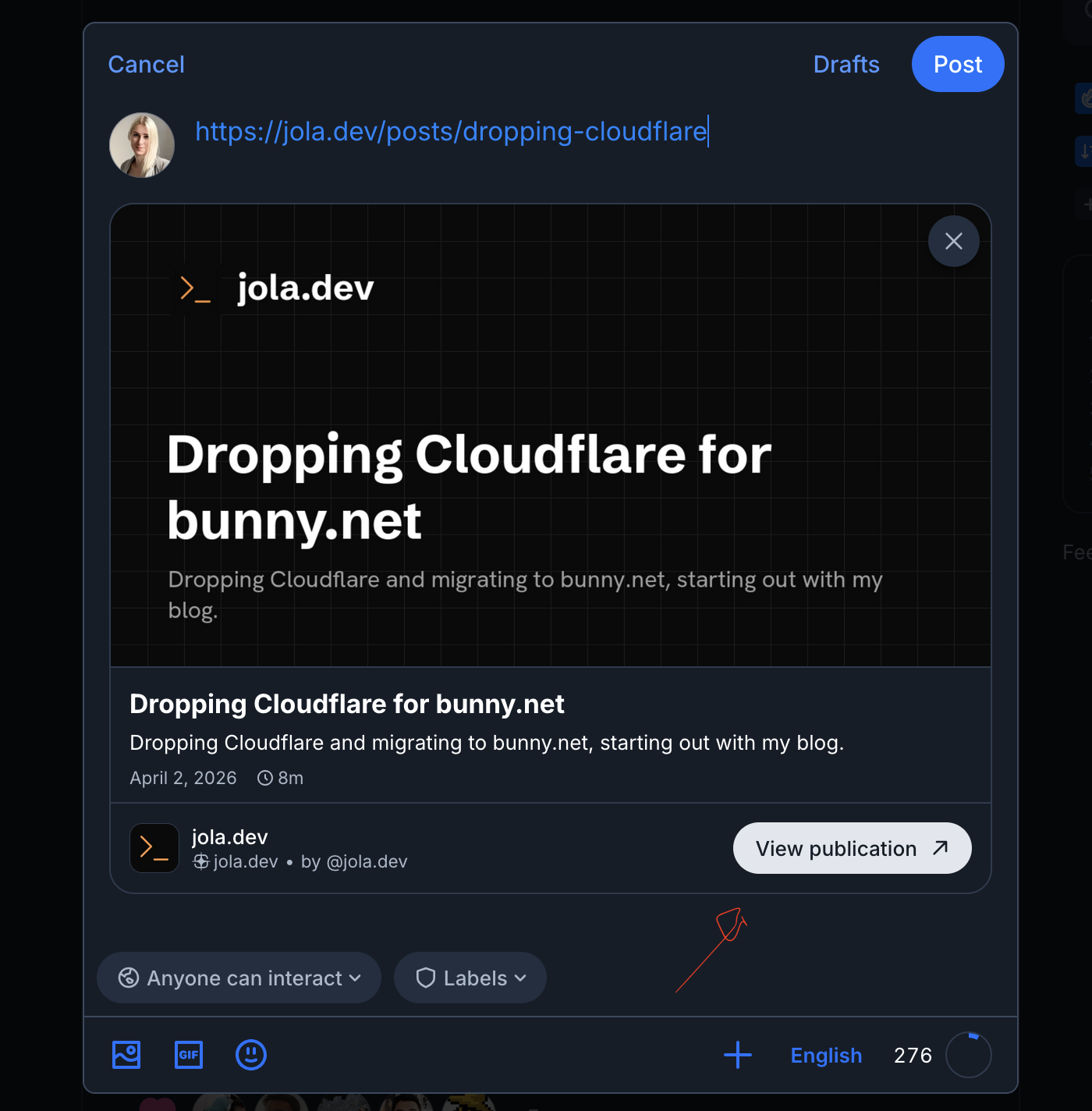
On top of that, once you’ve published your records, you can view them in atproto explorer, in pdsls.dev, and they’ll automatically be aggregated in several places like docs.surf. To read more about why federated content is cool, Mat Marquis goes into more detail here.
You can use pdsls.dev, signing in to your account, to manually create records. But it'd be more fun to do it in Elixir and start working towards automation! I wanted to get something up and running without too much complexity, so I went for an approach where I manually publish my posts using a mix command. So the end result we’re aiming for is being able to run something like mix atproto.publish <slug>, and have that record point at the live post on this website.
Okay, let’s look at some code!
A very basic atproto client
I spent a day exploring this and I ended up with a basic atproto client and some simple niceties. I made a deliberate effort not to DRY things up too much, I’m very much in the camp of “most abstractions are premature”. I’d rather feel the pain a little bit before I get too clever.
To be able to publish our records we need a PDS, a Personal Data Server. You’re free to set up your own, it’s basically your home in the atproto universe, where your data lives. You’ll also need an account. I’ll be using my main Bluesky account, jola.dev, and the main Bluesky API endpoint https://bsky.social/xrpc. Armed with an identifier and a password, we’re ready to go.
We’re going to be implementing an atproto client with 4 different operations: login, resolve_handle, create_publication, and publish_document.
Let’s start with resolve_handle. We only need to run this once really, it will turn our handle, like jola.dev, into a did, a permanent unique identifier. If you already know your did, you can skip this.
def resolve_handle(handle) do
  result =
    Req.get("https://bsky.social/xrpc/com.atproto.identity.resolveHandle",
      params: [handle: handle]
    )

  case result do
    {:ok, %Req.Response{status: 200, body: %{"did" => did}}} -> {:ok, did}
    {:ok, %Req.Response{status: status, body: body}} -> {:error, {:atproto_error, status, body}}
    {:error, reason} -> {:error, reason}
  end
end
Run that in IEx and you should get your did back. Make a note of it and let’s continue with login. Oh, and if you’re self-hosting or for some reason you’re not sure where your PDS is, you can use the did to discover it using plc.directory. If you know where to direct your requests, you can actually skip this step because login also returns the did. But nice to know! Back to the client operations.
def login(identifier, password) do
  result =
    Req.post("https://bsky.social/xrpc/com.atproto.server.createSession",
      body: JSON.encode!(%{identifier: identifier, password: password}),
      headers: [{"Content-Type", "application/json"}]
    )

  case result do
    {:ok,
     %Req.Response{
       status: 200,
       body: %{"did" => did, "accessJwt" => access_token, "refreshJwt" => refresh_token}
     }} ->
      {:ok, %{did: did, access_token: access_token, refresh_token: refresh_token}}

    {:ok, %Req.Response{status: status, body: body}} ->
      {:error, {:atproto_error, status, body}}

    {:error, reason} ->
      {:error, reason}
  end
end
We actually only need access_token here, but I imagine I’ll use the other fields too in the future so I’m “documenting” them for myself here.
We can take a little break here and try it out in IEx.
iex(1)> {:ok, session} = Client.login("jola.dev", password)
{:ok,
 %{
   refresh_token: "eyJ0eX...",
   access_token: "eyJ0eX...",
   did: "did:plc:bvraa6gajy4tfr3eh2sisdkr"
 }}
Excellent! Now we have an access_token and we’re basically unstoppable. Let’s sketch out the remaining operations before we implement the helpers we need.
def create_publication(session, %Publication{} = publication) do
  with {:ok, icon} <- upload_blob(session, publication.icon) do
    record = publication_record(publication, icon)
    put_record(session, "site.standard.publication", "self", record)
  end
end

def publish_document(session, %Document{} = document) do
  with {:ok, cover_image} <- upload_blob(session, document.cover_image) do
    record = document_record(document, cover_image)
    put_record(session, "site.standard.document", document.rkey, record)
  end
end
create_publication we’ll use to create our… well, publication. This would be your website! And then publish_document is for publishing each blog post. Excellent. Let’s continue. In the interest of time (?) I’m going to drop a big chunk of code on you here, but it’s just plumbing. We need to shape the request payloads for the atproto API, we need a helper for uploading our blog post preview images, and then some tidying up date times.
defp publication_record(%Publication{} = publication, icon) do
  %{
    "$type" => "site.standard.publication",
    "name" => publication.name,
    "url" => publication.url,
    "description" => publication.description,
    "icon" => icon
  }
end

defp document_record(%Document{} = document, cover_image) do
  %{
    "$type" => "site.standard.document",
    "site" => document.site,
    "title" => document.title,
    "path" => document.path,
    "publishedAt" => to_rfc3339(document.published_at),
    "updatedAt" => to_rfc3339(document.updated_at),
    "description" => document.description,
    "tags" => document.tags,
    "coverImage" => cover_image
  }
end

defp put_record(session, collection, rkey, record) do
  headers = [
    {"Authorization", "Bearer #{session.access_token}"},
    {"Content-Type", "application/json"}
  ]

  body = JSON.encode!(%{repo: session.did, collection: collection, rkey: rkey, record: record})
  result = Req.post("https://bsky.social/xrpc/com.atproto.repo.putRecord", body: body, headers: headers)

  case result do
    {:ok, %Req.Response{status: 200, body: body}} -> {:ok, body}
    {:ok, %Req.Response{status: status, body: body}} -> {:error, {:atproto_error, status, body}}
    {:error, reason} -> {:error, reason}
  end
end

defp upload_blob(_session, nil), do: {:ok, nil}

defp upload_blob(session, {bytes, content_type}) do
  headers = [
    {"Authorization", "Bearer #{session.access_token}"},
    {"Content-Type", content_type}
  ]

  case Req.post("https://bsky.social/xrpc/com.atproto.repo.uploadBlob", headers: headers, body: bytes) do
    {:ok, %Req.Response{status: 200, body: %{"blob" => blob}}} -> {:ok, blob}
    {:ok, %Req.Response{status: status, body: body}} -> {:error, {:atproto_error, status, body}}
    {:error, reason} -> {:error, reason}
  end
end

# atproto expects `rfc3339`, Elixir has `iso8601` which is compatible
defp to_rfc3339(%Date{} = date) do
  date
  |> DateTime.new!(~T[00:00:00], "Etc/UTC")
  |> DateTime.to_iso8601()
end
That’s it for the client! Let’s take a closer look at the data we’re sending.
The shape of the records
Structs are a great way to bring some compile time hints and support to your developer experience, so let’s add some!
defmodule JolaDev.Atproto.Publication do
  @enforce_keys [:name, :url]
  defstruct @enforce_keys ++ [:description, :icon]
end

defmodule JolaDev.Atproto.Document do
  @enforce_keys [:rkey, :site, :title, :path, :published_at]
  defstruct @enforce_keys ++ [:updated_at, :description, :tags, :cover_image]
end
And the main piece of glue, I’ve chosen to organize like this.
defmodule JolaDev.Atproto do
  alias JolaDev.Atproto.Document
  alias JolaDev.Atproto.Publication
  alias JolaDev.Blog.Post

  @did "did:plc:bvraa6gajy4tfr3eh2sisdkr"
  @url "https://jola.dev"

  def publication_uri, do: "at://#{@did}/site.standard.publication/self"
  def document_uri(rkey), do: "at://#{@did}/site.standard.document/#{rkey}"

  def publication do
    %Publication{
      name: "jola.dev",
      url: @url,
      description: "Johanna Larsson's blog",
      icon:
        {File.read!(Application.app_dir(:jola_dev, "priv/static/images/logo.png")), "image/png"}
    }
  end

  def document(%Post{} = post) do
    {:ok, cover_image} = JolaDev.OGImage.image_for("posts/#{post.id}")

    %Document{
      rkey: post.id,
      site: publication_uri(),
      title: post.title,
      path: "/posts/#{post.id}",
      published_at: post.date,
      updated_at: post.last_modified,
      description: post.description,
      tags: post.tags,
      cover_image: {cover_image, "image/png"}
    }
  end
end
Everything is coming together! We can now turn a NimblePublisher post into a Document for our atproto client, and we’ve got our site definition, aka Publication.
Proving you’re you
Time for a little interlude. We’ve been looking at creating publications and documents in the standard.site schema, but how does the atproto ecosystem prevent just anyone from publishing things in your name? After all, it’s just accepting the url and other fields that you’re providing.
The first piece of the puzzle is /.well-known/site.standard.publication. You put this record on your site to prove that your publication is legit. Let’s set up a little route and controller for it.
defmodule JolaDevWeb.WellKnownController do
  use JolaDevWeb, :controller

  def publication(conn, _params) do
    conn
    |> put_resp_content_type("text/plain")
    |> text(JolaDev.Atproto.publication_uri())
  end
end
And the router needs something like get "/.well-known/site.standard.publication", WellKnownController, :publication. That’s the publication covered, but what about the documents?
Just like Mastodon, we can use a link tag in the head tag of our blog post to prove ourselves. Let’s add a little section to our root.html.heex in the head section.
<%= if post = @conn.assigns[:post] do %>
	<link rel="site.standard.document" href={JolaDev.Atproto.document_uri(post.id)} />
<% end %>
So we’re using the document_uri function we just defined to build the full URI of the post, as atproto would expect to find it. You’ll only want to do this on pages that have posts, which is why I’ve put an if statement around it.
We’re finally ready to start publishing!
Actually publishing documents
As mentioned I went for a simple mix task. It makes it a manual process, but I can live with having to manually publish these after posting to my blog. For now anyway, I’m sure I’ll end up doing something clever eventually. But first, let’s tackle the publication itself, since it’s just a one off and it needs to exist first. I ended up just executing this in IEx.
iex(1)> {:ok, session} = Client.login("jola.dev", password)
{:ok,
 %{
   refresh_token: "eyJ0eX...",
   access_token: "eyJ0eX...",
   did: "did:plc:bvraa6gajy4tfr3eh2sisdkr"
 }}
iex(2)> {:ok, result} = Client.create_publication(session, Atproto.publication())
{:ok,
 %{
   "cid" => "bafyreiftkrgpmyyjts6gkkcnzsjqgvocz6rtqy4uwf2xmqigu53ij5mclu",
   "commit" => %{
     "cid" => "bafyreiaewmxamg4w6ofjpukpg5pemyxvi3klw5tq3tgzic3xualdcffk4i",
     "rev" => "3mnfzhzzpmp2j"
   },
   "uri" => "at://did:plc:bvraa6gajy4tfr3eh2sisdkr/site.standard.publication/self",
   "validationStatus" => "unknown"
 }}
That’s it. You can see the record live in the atproto explorer.
But documents is more a repetitive task, so this is where the mix task comes in.
defmodule Mix.Tasks.Atproto.Publish do
  @shortdoc "Publishes a blog post as a standard.site record."

  use Mix.Task

  alias JolaDev.Atproto
  alias JolaDev.Atproto.Client

  def run([slug]) do
    Application.ensure_all_started(:req)

    password = System.fetch_env!("PASSWORD")
    post = JolaDev.Blog.find_by_id(slug)

    {:ok, session} = Client.login("jola.dev", password)
    {:ok, result} = Client.publish_document(session, Atproto.document(post))

    Mix.shell().info("Published #{slug} as #{result["uri"]}")
  end
end
Let’s try it out.
➜  jola.dev git:(main) PASSWORD=<password> mix atproto.publish generating-og-images
Published generating-og-images as at://did:plc:bvraa6gajy4tfr3eh2sisdkr/site.standard.document/generating-og-images
Do it automatically?
I hope that’s been useful and at least vaguely interesting. I’m very curious to see where all this will lead. I doubt you’ll be able to just copy paste everything that I have here and that it’ll just work for you, although I guess if you’ve set up NimblePublisher the same way I have, it might! But it should provide the blueprint for you to set things up for yourself.
In the post I’ve cut some corners, it’s already a lot of code. One of those corners is that atproto documents support textContent, so you can publish the content of your post, meaning the whole thing lives fully on the PDS, which is cool. The full version is available on Github.
I know I said I don’t want to get clever about this, but I have been thinking about approaches to automatically publishing new blog posts. I might want to do something where, at deploy time I compare what’s published and what’s not, and then do some reconciliation? We’ll see where I end up! Thanks for reading!
Written by Johanna Larsson. Thoughts on this post? Find me on Bluesky at @jola.dev.
Related posts
Generating OG images in Elixir
Generating OG images for your static pages and blog posts in Elixir
The social contract of writing
About the value of genuine writing in a world being drowned in slop.
Highest Random Weight in Elixir
A description of HRW/rendezvous hashing and the HRW elixir library.